Introduction
Hello everyone! This write-up is about exploiting Android application's most commonly used root detection mechanism (RootBeer) through reverse engineering and code manipulation. Here I will be using the BugBazaar application (a vulnerable APK playground built for Android security enthusiasts) to showcase the vulnerability and how to exploit it.
RootBeer is one of the most popular open-source root detection libraries used by Android developers to identify rooted devices. It performs various checks to detect traces of root access on the device. In this demonstration, I'll walk you through the process of bypassing this protection mechanism by tampering with the application's Smali code.
Tools Required
- Android Virtual Machine - I used Android Studio's default emulator for testing
- Jadx - APK file decompiler for analyzing the application's code
- Apklab - VS Code extension used for code manipulation and repacking APK files
This technique should only be used on applications you own or have explicit permission to test. Bypassing security mechanisms in production applications without authorization may violate terms of service and local laws.
Understanding the Application Protection
Protection Settings in BugBazaar
When we install the application on a rooted device, we can use the application without any restrictions. In order to trigger the restrictions, we have to toggle it manually in Menu → App Protection Settings.
There are three kinds of protection settings, namely:
- Easy Level - RootBeer root detection
- Medium Level - ADB detection and Emulator detection
- Advanced Level - Few other RASP detection mechanisms (Lingzhiyi Frida detection, Darvin Security, etc.)
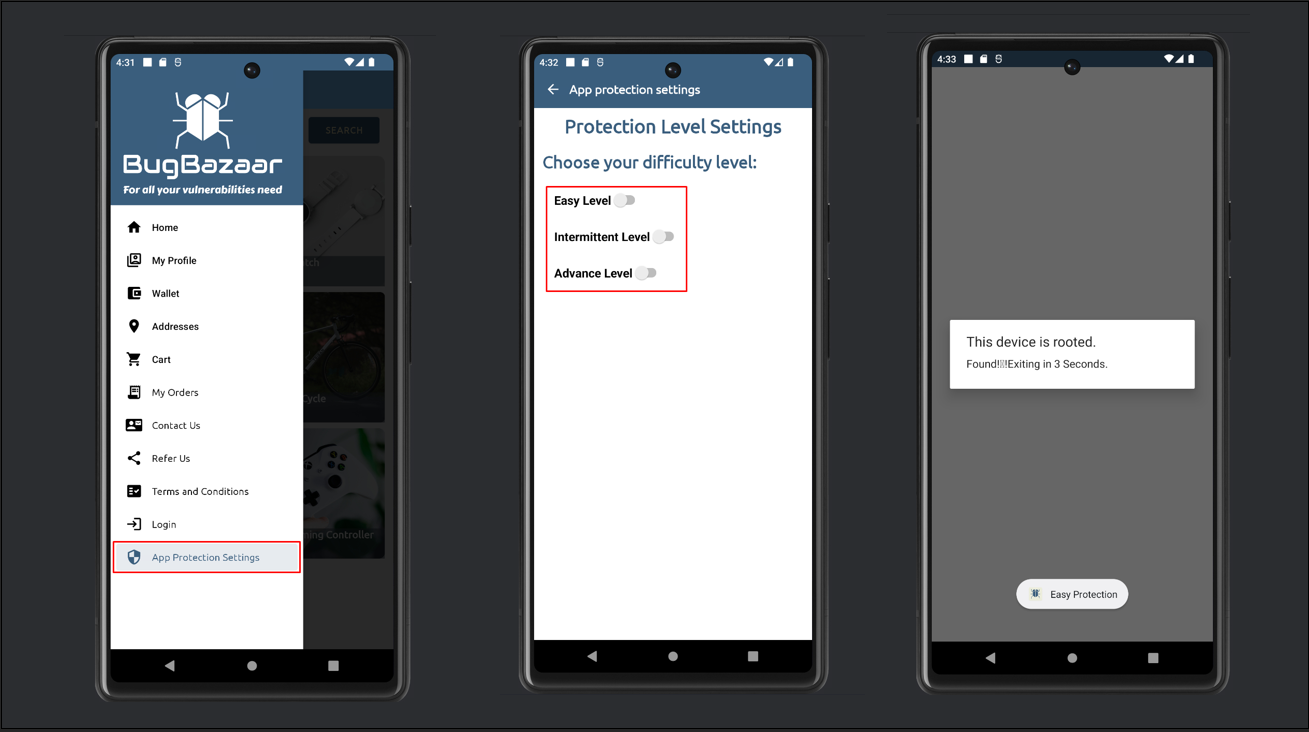
[Image: BugBazaar application running on a rooted device with protection settings menu]
Here we are primarily focusing on RootBeer root detection bypass, where there is a local check (isRooted() and isRootedWithBusyBoxCheck()) based on various traces detected on the rooted devices. If any traces are found on the running device, the functions will provide the output as true, which will determine whether the device is rooted or not.
RootBeer checks for various root indicators including su binary presence, root management apps, dangerous props, RW paths, and BusyBox installation. If any of these checks return true, the device is flagged as rooted.
Bypass Strategy
In order to bypass this check, we have to manipulate the code via tampering or at runtime to make the code return false from the isRooted() function. Here I will be tampering the code to bypass the root check.
First, we have to check where the check is happening. Since we know that we are dealing with RootBeer here, we can directly search whether the RootBeer package (com.scottyab.rootbeer) is present or not.
Analyzing the RootBeer Package
Locating RootBeer Classes
We can see in the code that the com.scottyab.rootbeer package is present. Within this package, there will be two main classes namely RootBeer and RootBeerNative. The RootBeer class will be responsible for root checks and the RootBeerNative class is responsible for loading native libraries.
Understanding the Root Detection Functions
We are going to tamper with the RootBeer class. Inside it, there are functions named isRooted() and isRootedWithBusyBoxCheck(). They will perform various checks and provide the Boolean output based on whether the system is rooted or not. We have to manipulate the code in a way that the code returns false even when the device is rooted.
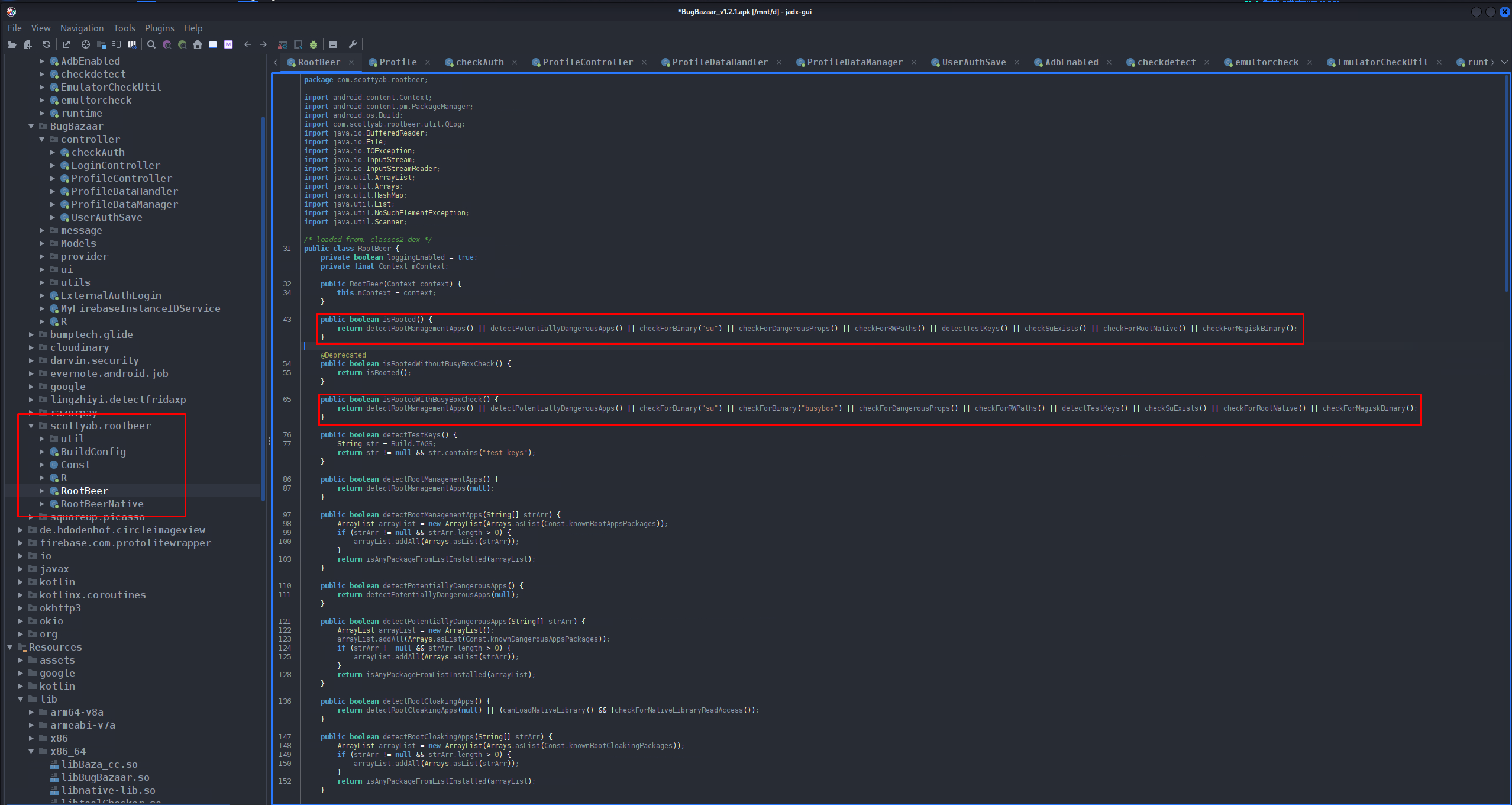
[Image: Java code showing isRooted() and isRootedWithBusyBoxCheck() methods in RootBeer class]
Understanding Smali Code
We can't directly tamper the Java code. We have to tamper the Smali code (a human-readable assembly language for Android's Dalvik bytecode, used to reverse-engineer and modify APKs). We can analyze the Smali code in Jadx itself.
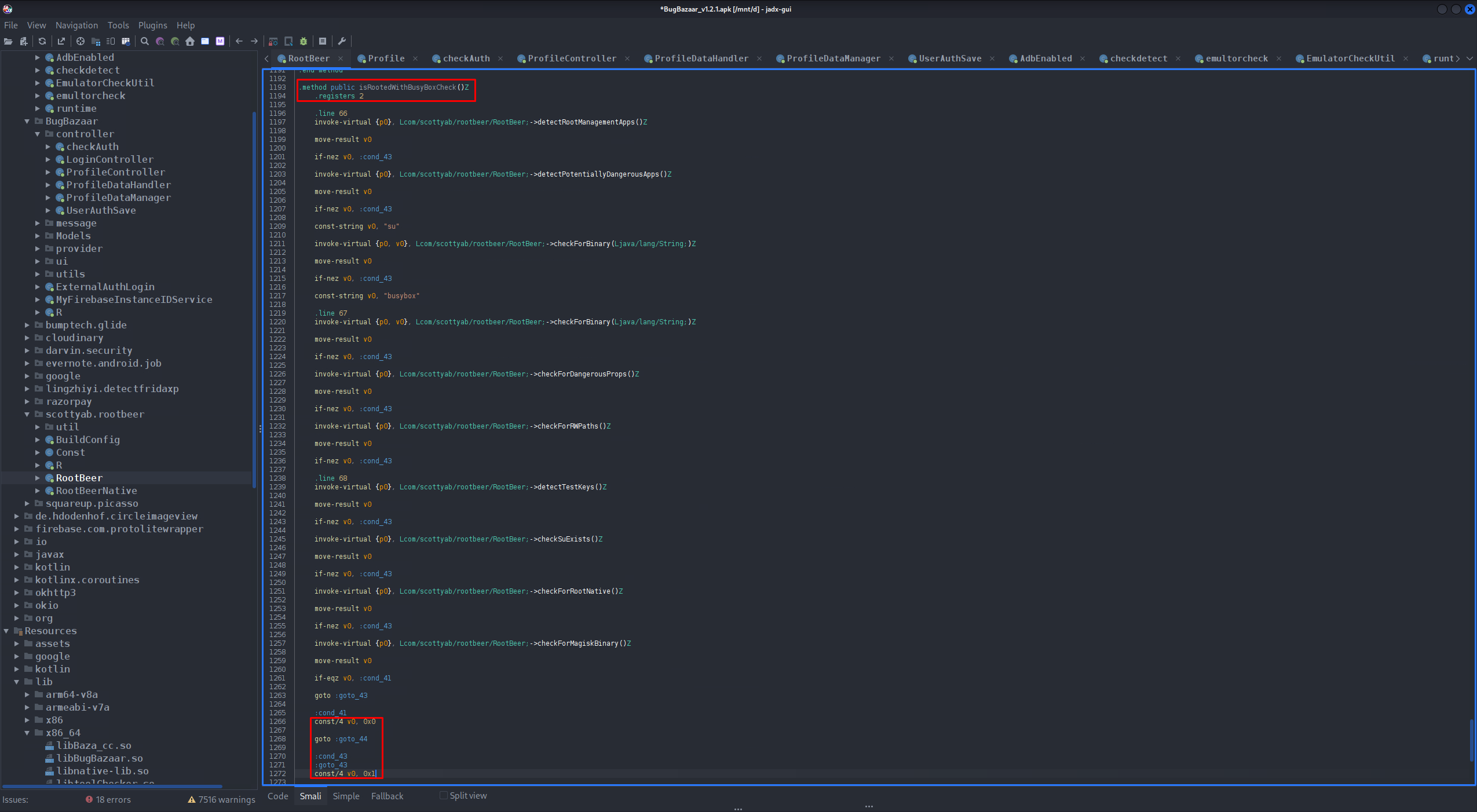
[Image: Jadx displaying the Smali code for the RootBeer class]
Analyzing the Smali Implementation
Here the method .method public isRooted()Z is the equivalent for the isRooted() function in Java. And the Boolean output of the function is denoted by:
const/4 v0, 0x1- represents trueconst/4 v0, 0x0- represents false
The same case applies for isRootedWithBusyBox() as well.
.method public isRooted()Z
    ....
    :cond_41
    const/4 v0, 0x0

    goto :goto_44
    :cond_43
    :goto_43
    const/4 v0, 0x1
    ....
.end method
The key to bypassing the root detection is to ensure that the function always returns false (0x0) regardless of what checks are performed.
Code Tampering Process
Modifying the Return Values
To make the function return false, we have to make both outputs as const/4 v0, 0x0 (false), so the output will be false even though the system is rooted. We have to do the same for isRootedWithBusyBox().
The strategy is simple: wherever the code sets v0 to 0x1 (true), we change it to 0x0 (false).
Modified Smali Code
.method public isRooted()Z
    ....
    :cond_41
    const/4 v0, 0x0  # Already false

    goto :goto_44
    :cond_43
    :goto_43
    const/4 v0, 0x0  # Changed from 0x1 to 0x0 - Now returns false
    ....
.end method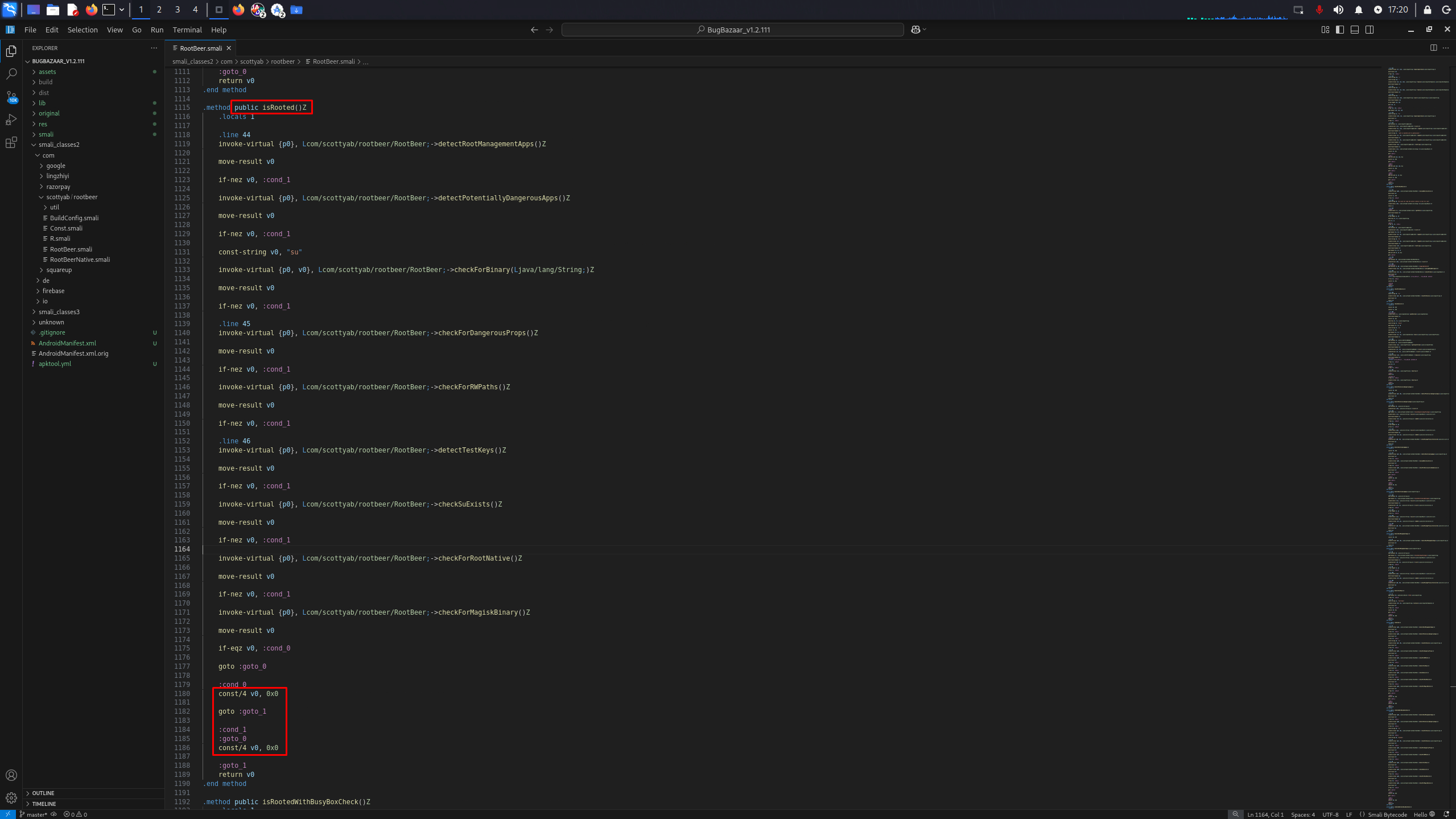
[Image: VS Code with Apklab showing the modified Smali code with changed return values]
Make sure to modify both isRooted() and isRootedWithBusyBoxCheck() methods to ensure complete bypass of the RootBeer protection mechanism.
Rebuilding and Testing the Modified APK
Recompiling the Application
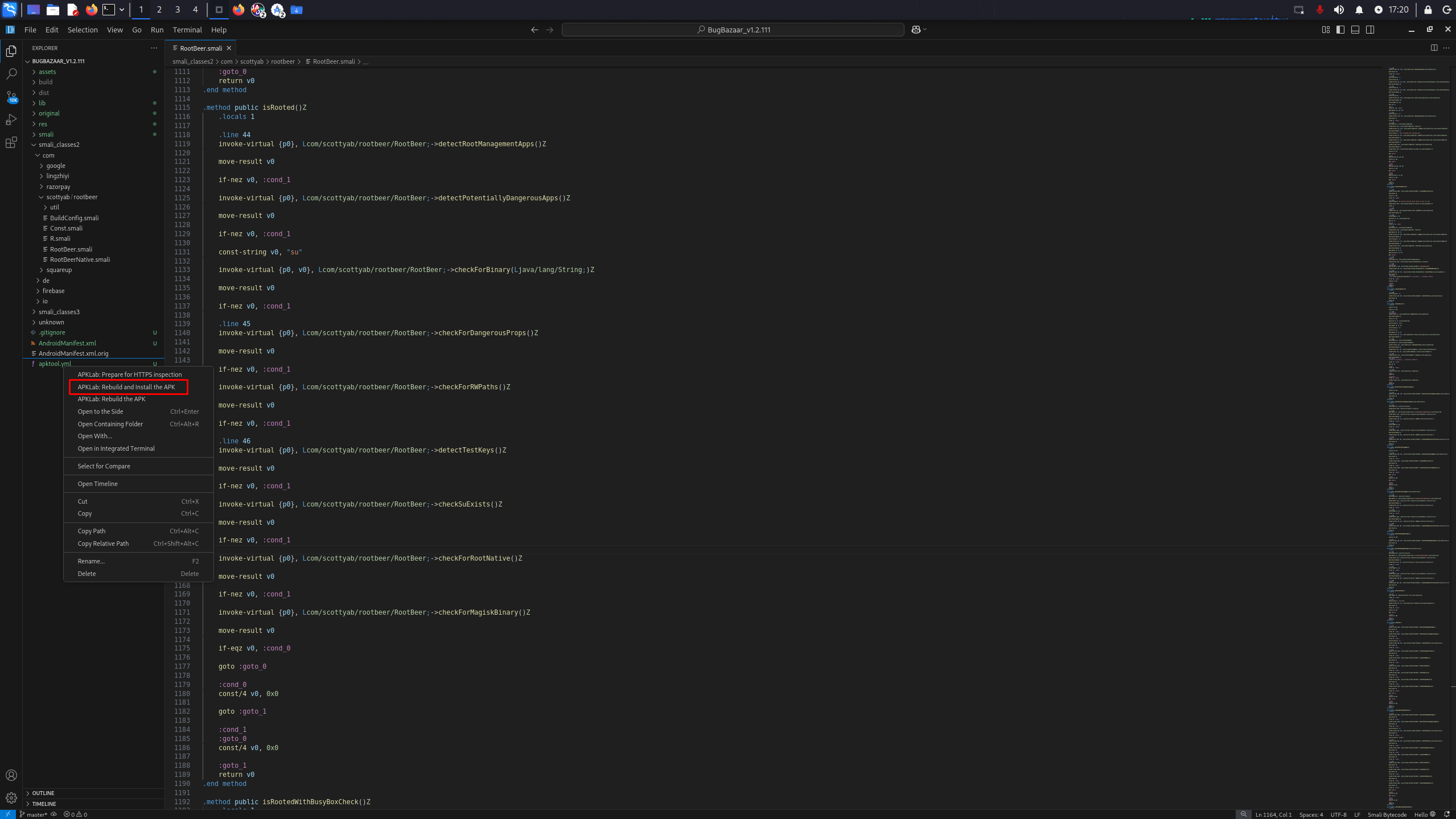
After completing the changes, right-click on the apktool.yml file, select rebuild, and install the APK. Don't forget to save the changes before rebuilding!
[Image: Apklab context menu showing rebuild and install options]
Verifying the Bypass
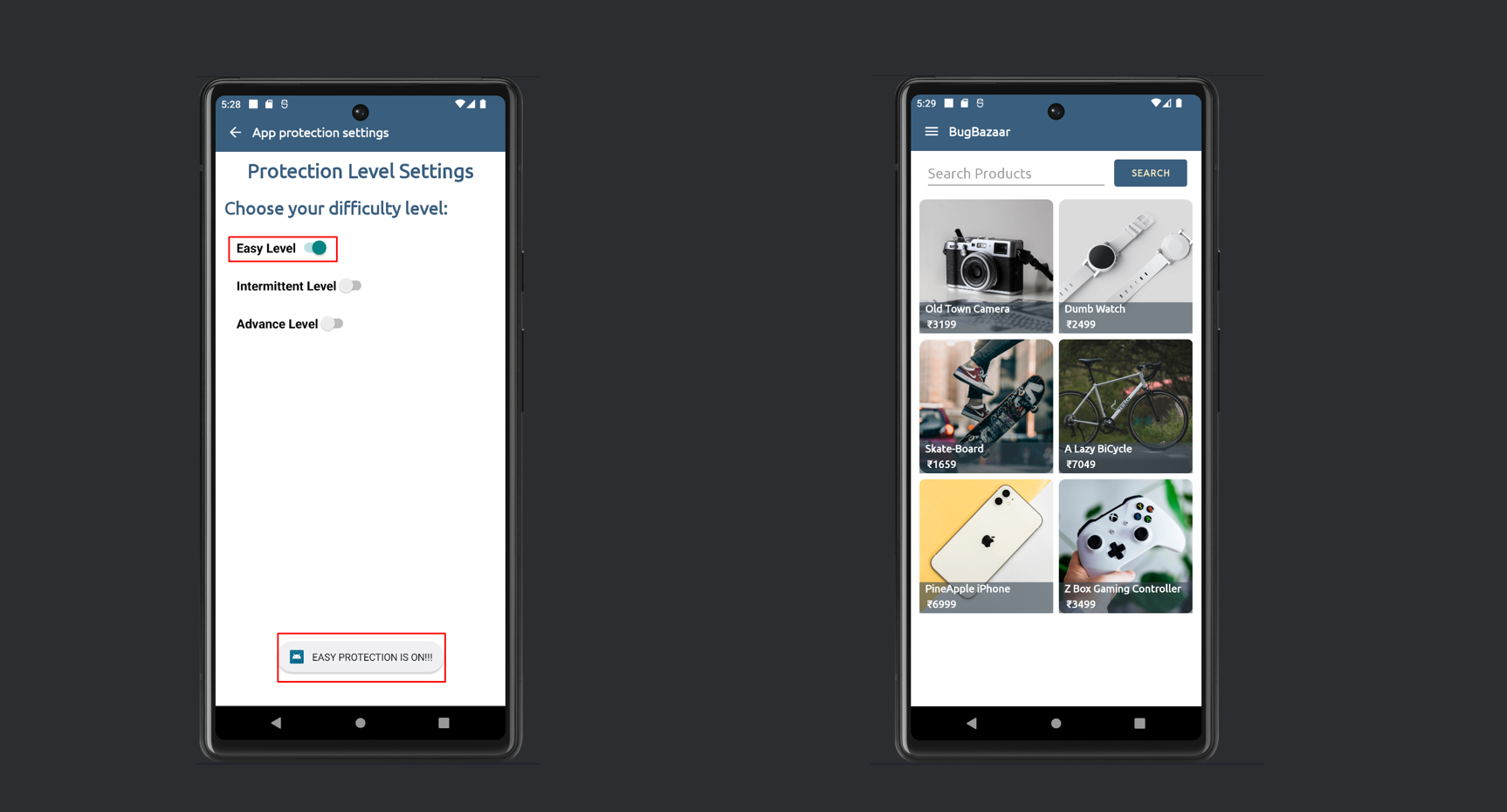
Then after the application is installed, when we toggle the easy level protection, the application runs instead of exiting. So we can confirm that the RootBeer protection is bypassed successfully!
[Image: Application running successfully with Easy Level protection enabled on a rooted device]
The application now runs on a rooted device even with RootBeer protection enabled, confirming that our bypass was successful.
Real-World Applications and Prevalence
Widespread Usage
This protection method is common in many Android applications and is present in one of the commonly used Flutter packages for root detection. Understanding how to bypass it is crucial for comprehensive security testing.
Dealing with Obfuscated Applications
If the application is obfuscated, the class name or function name won't be the same. In such cases, try searching for classes where com.scottyab.rootbeer is imported. You can find functions with similar methods and patterns like the RootBeer class we have seen.
Even in obfuscated apps, look for patterns like multiple boolean checks combined with OR operators, checks for su binary, busybox, and root management apps. These are telltale signs of RootBeer implementation.
Security Implications
Client-side root detection can be bypassed through static analysis and code manipulation. This demonstrates that relying solely on client-side checks is insufficient for protecting sensitive applications.
Real-World Impact
- Banking and financial apps relying on RootBeer can be accessed on rooted devices
- Sensitive data protected only by root detection is at risk
- Payment processing apps may be vulnerable to fraud on modified devices
- DRM-protected content can be accessed on rooted devices
- In-app purchase validation can be bypassed
Better Defense Strategies
Multi-Layered Approach
While RootBeer is a good starting point, it should never be the only line of defense. Here are some recommendations for stronger protection:
- Server-side validation: Critical security decisions should always be made on the server side
- Native code checks: Implement root detection in native libraries (C/C++) which are harder to reverse engineer
- Runtime integrity checks: Use SafetyNet/Play Integrity API for device attestation
- Code obfuscation: Use ProGuard/R8 with aggressive obfuscation settings
- Multiple detection methods: Combine RootBeer with custom checks and behavior analysis
- Tamper detection: Implement signature verification and checksum validation
- SSL pinning: Prevent man-in-the-middle attacks on rooted devices
Implement defense in depth - use multiple layers of security checks, combine client-side and server-side validation, and never trust the client completely. Make it time-consuming and expensive for attackers to bypass all protections.
Conclusion
This write-up demonstrated how to bypass the RootBeer root detection mechanism through static code analysis and Smali modification. While RootBeer is a popular and useful library, it's important to understand that any client-side security measure can be bypassed with enough effort.
The key takeaways are:
- Client-side root detection is bypassable through reverse engineering
- Multiple layers of security are essential for protecting sensitive applications
- Server-side validation should always be implemented for critical operations
- Security testing should include attempts to bypass protection mechanisms
- Defense in depth is the only reliable approach to application security
For developers: Use RootBeer as part of a comprehensive security strategy, not as your only defense. For security researchers: Always test how applications respond to root detection bypasses to help improve overall Android security.
Additional Resources
- RootBeer - Simple to use root checking Android library
- Jadx - Dex to Java Decompiler
- APKLab - VS Code Extension
- OWASP Mobile Top 10
- Mobile Application Penetration Testing Cheatsheet
If you found this write-up helpful or have questions about Android security testing and RASP bypass techniques, feel free to reach out via the contact section. Stay curious and hack responsibly!