Introduction
Hello everyone! This write-up is about exploiting Android application's local authentication mechanisms through reverse engineering and code manipulation. Here I will be using the BugBazaar application (a vulnerable APK playground built for Android security enthusiasts) to showcase the vulnerability and how to exploit it.
BugBazaar is an intentionally vulnerable application designed to help security researchers and enthusiasts understand common Android security vulnerabilities. In this demonstration, I'll walk you through bypassing the local authentication by tampering with the application's logic at the bytecode level.
Tools Required
- Android Virtual Machine - I used Android Studio's default emulator for testing
- Jadx - APK file decompiler for analyzing the application's code
- Apklab - VS Code extension used for code manipulation and repacking APK files
This technique should only be used on applications you own or have explicit permission to test. Unauthorized modification and reverse engineering of applications may violate terms of service and local laws.
Understanding the Application
Initial Analysis
When we install the application and navigate to the login page, the application prompts us to enter a username and password. The credentials are not provided anywhere in the UI, so typically we would need to reverse engineer the application and find the hardcoded credentials. However, in this demonstration, I will be tampering with the logic of the login mechanism so that it returns true even if I provide wrong credentials.
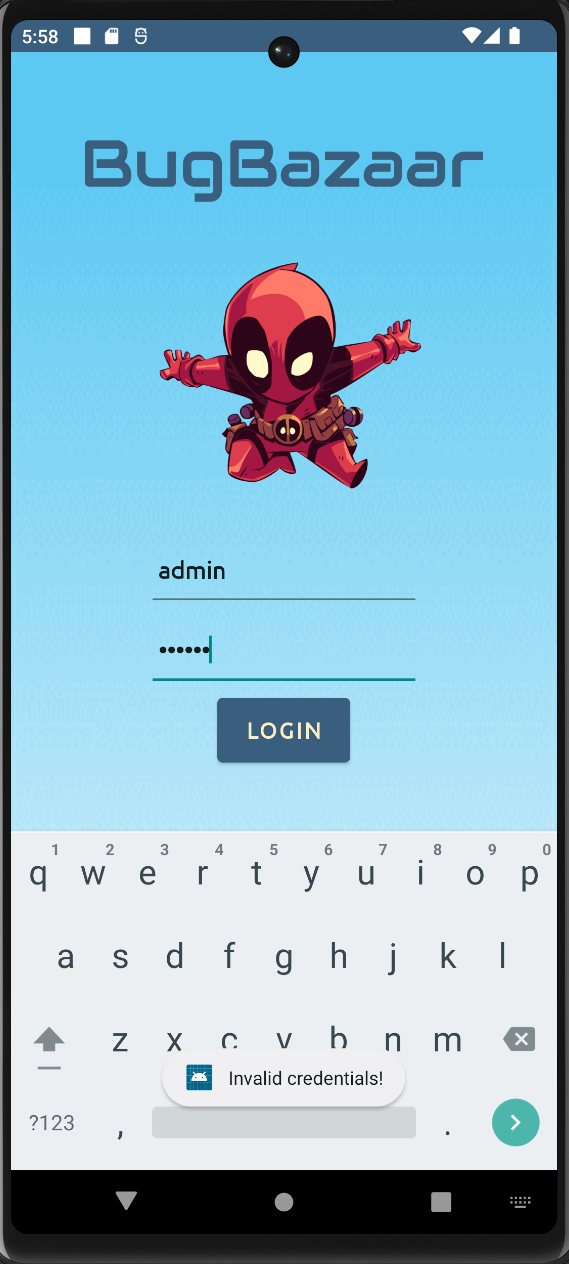
[Image: Application login screen prompting for username and password]
Decompilation and Code Analysis
Analyzing the Login Logic
I decompiled the application with Jadx and analyzed the application's logic for login. The application validates the provided username and password with the legitimate ones using loginController.validateLogin() and stores true or false in the Boolean variable zValidateLogin based on the given username and password.
The original code logic looks like this:
Boolean zValidateLogin = Signin.this.loginController.validateLogin(username, password);

if (zValidateLogin) {
    // Login successful
}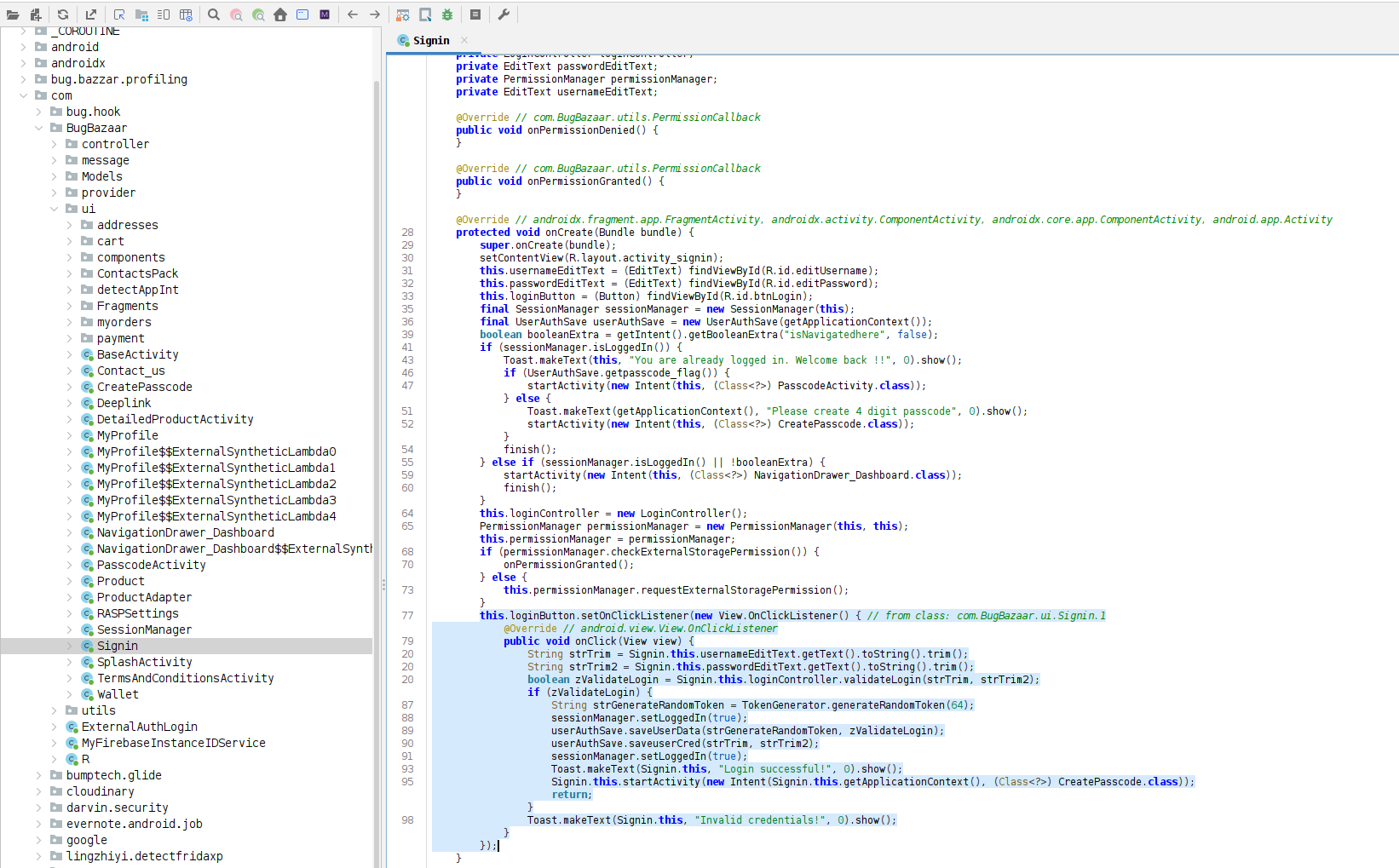
[Image: Jadx decompiler showing the login validation logic in Java code]
Planning the Attack
We need to tamper the code in a way that it will return true as output even if we provide wrong inputs. For example, the modified code will look like:
Boolean zValidateLogin = Signin.this.loginController.validateLogin(username, password);
zValidateLogin = true;  // Force the value to true

if (zValidateLogin) {
    // Login will always succeed
}
So, the output will be true no matter what the input is. However, we can't directly tamper the Java code. We have to tamper the Smali code instead.
Understanding Smali Code
Smali is a human-readable assembly language for Android's Dalvik bytecode, used to reverse-engineer and modify APKs. When we modify an APK, we work with Smali code, not Java code.
Locating the Smali Code
We can analyze the Smali code in Jadx itself. The key instruction we're looking for is:
invoke-virtual {v1, p1, v0}, Lcom/BugBazaar/controller/LoginController;->validateLogin(Ljava/lang/String;Ljava/lang/String;)Z
move-result v1
This is the Smali equivalent of loginController.validateLogin(). After this operation is performed, I need to add a line to assign the value of true to v1.
The code snippet to assign the value true is:
const/4 v1, 0x1
This instruction sets the register v1 to 0x1 (which represents true in boolean context).
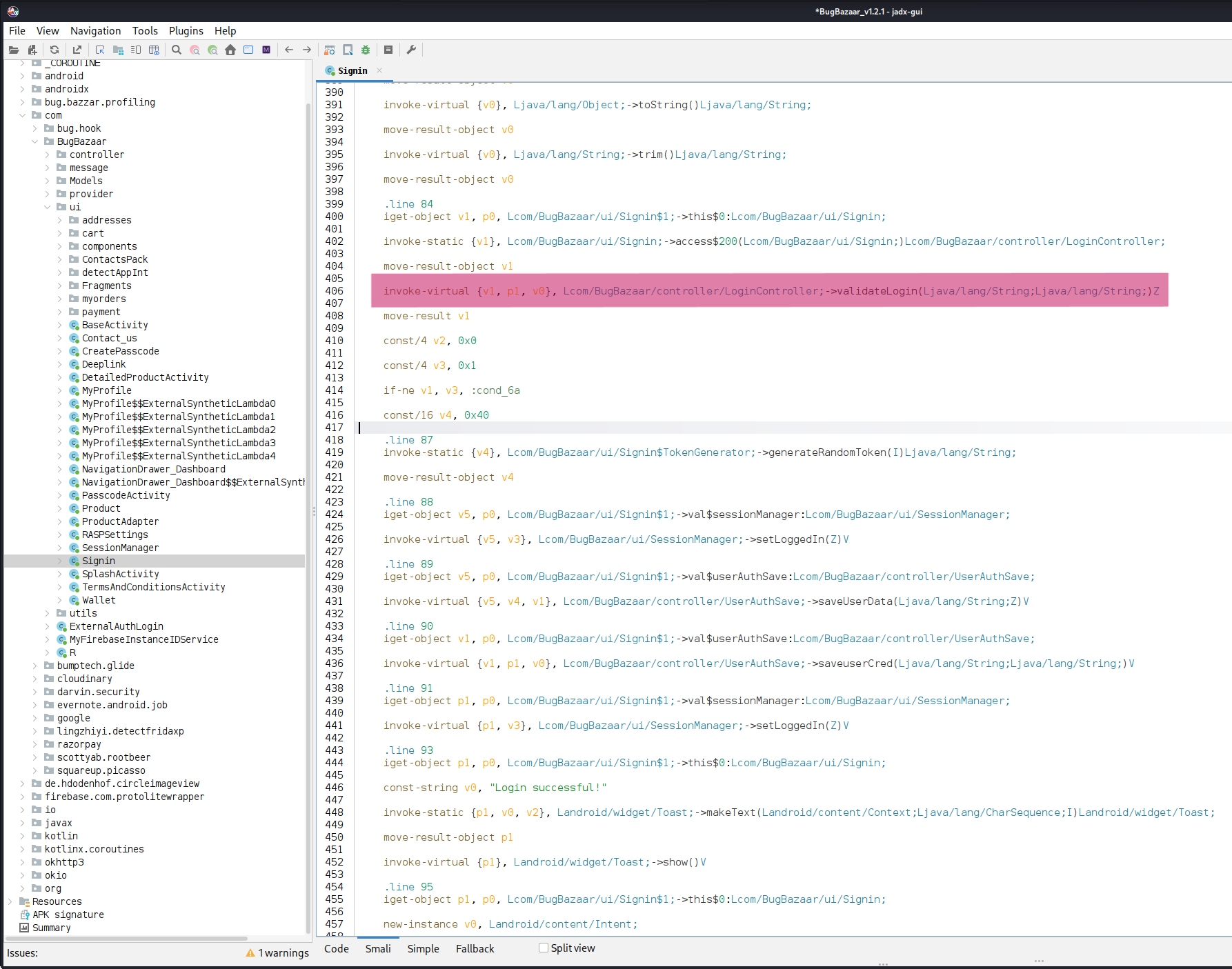
[Image: Jadx showing the Smali code for the login validation method]
Code Tampering Process
Setting Up Apklab
To tamper the code, I will be using the Apklab extension in VS Code. I opened the APK file in Apklab with the following configuration:
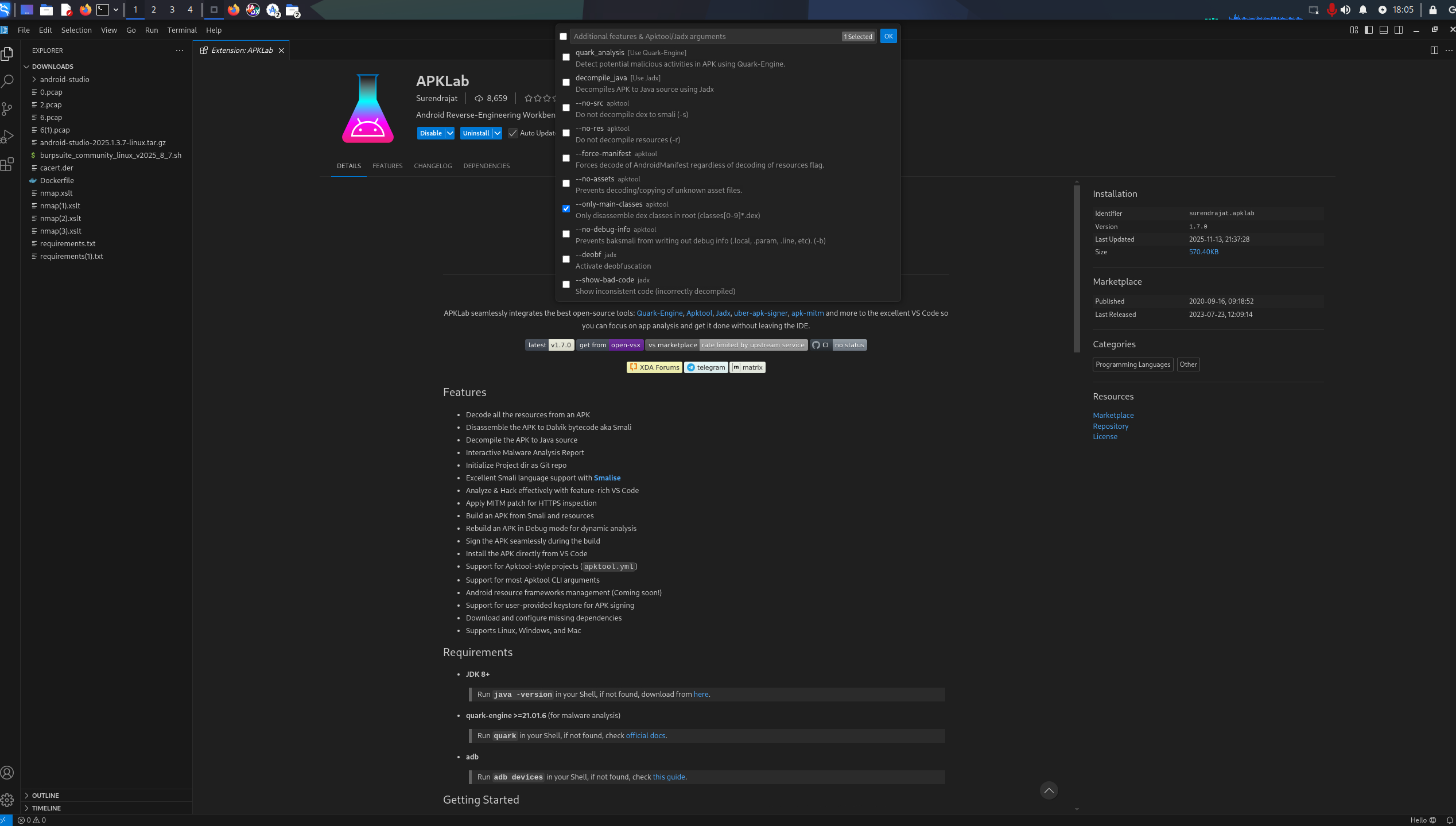
[Image: Apklab in VS Code showing the APK opening dialog]
Note: I did not select the "decompile Java" function, since all I was going to do is tamper with Smali code and recompile the application. You can select it if you want to analyze the Java code. However, modifications in the Java code won't be reflected in the recompiled application.
Modifying the Smali Code
I tampered with the code in the signin module by adding const/4 v1, 0x1 right after the login function is performed. Whatever the output from the loginController function, the code I added will overwrite it and provide true.
The modified Smali code looks like this:
invoke-virtual {v1, p1, v0}, Lcom/BugBazaar/controller/LoginController;->validateLogin(Ljava/lang/String;Ljava/lang/String;)Z
move-result v1
const/4 v1, 0x1    # Force v1 to true

if-eqz v1, :cond_0  # Check if v1 is true
# Login success logic here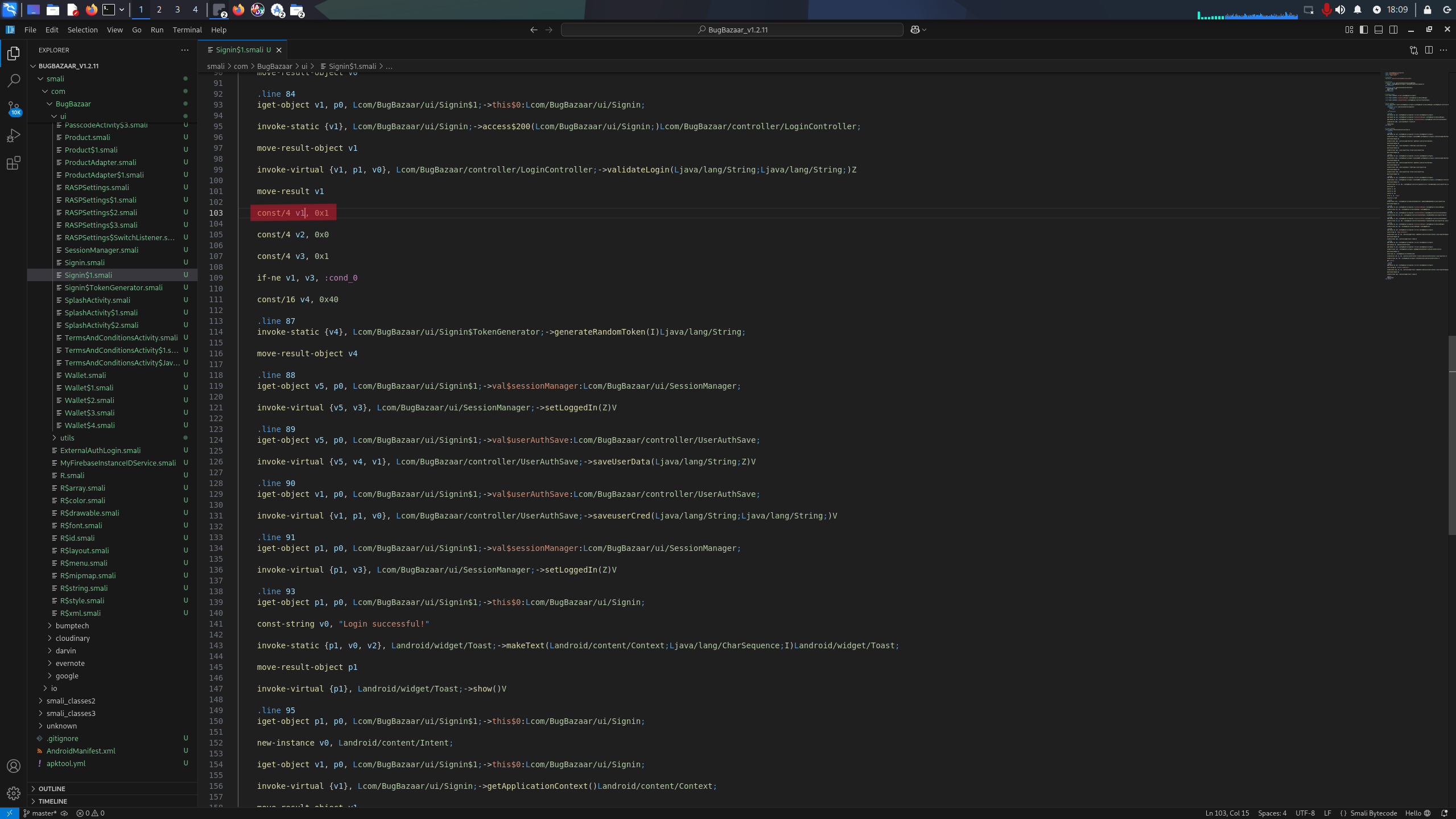
[Image: VS Code with Apklab showing the tampered Smali code]
Rebuilding and Installing the APK
Recompiling the Application
After completing the changes, I right-clicked on the apktool.yml file and selected "Rebuild APK" to recompile the modified application. Once the rebuild process completed successfully, I selected "Install APK" to deploy it to my Android emulator.
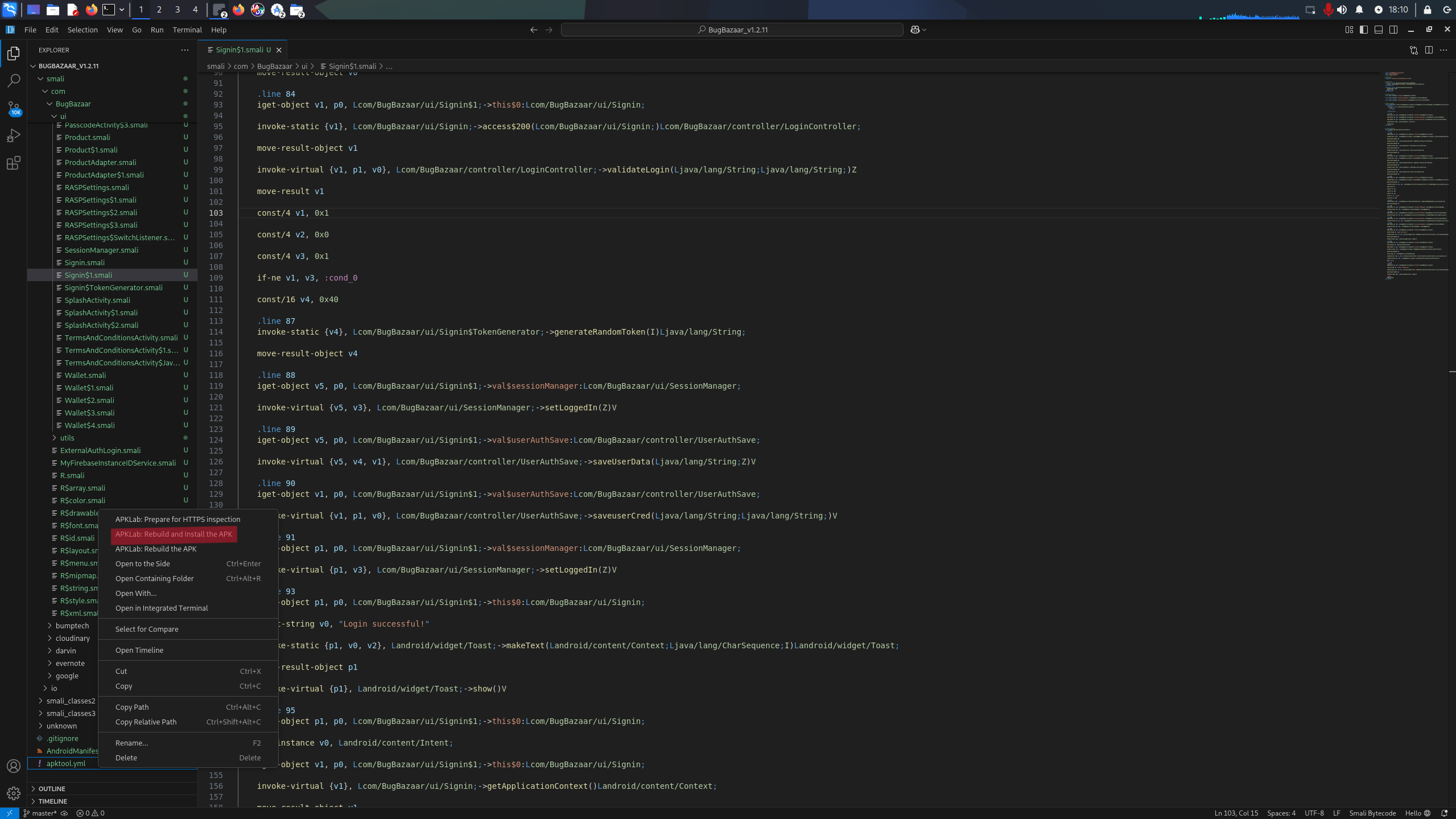
[Image: Apklab context menu showing rebuild and install options]
Testing the Exploit
Verifying the Bypass
Once the APK file was installed, I navigated to the login page and entered some random input to test the bypass. I used admin as both username and password.
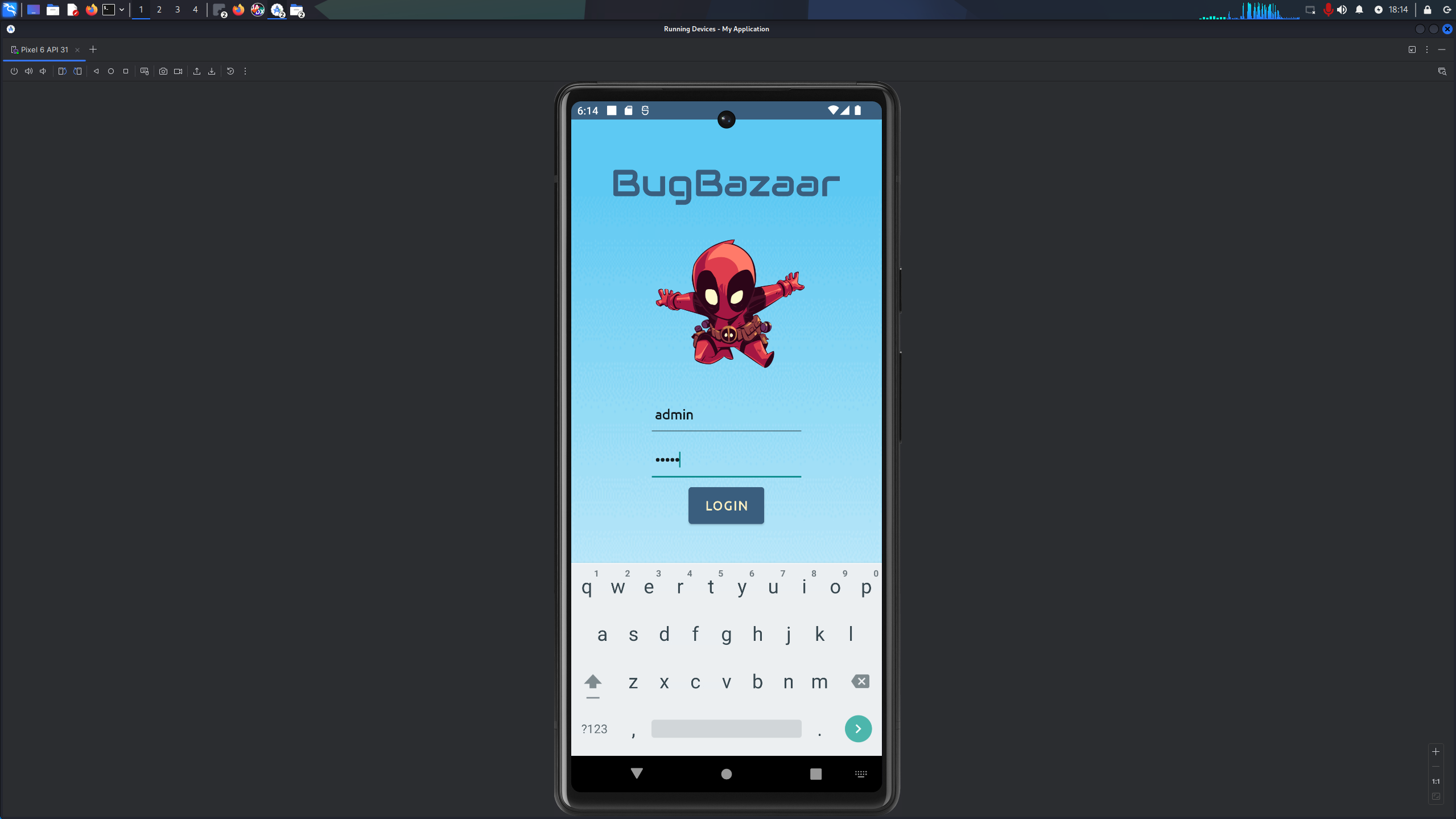
[Image: Login screen with random credentials being entered]
Successful Authentication Bypass
Because of the tampering, the login was successful! The system prompted me to set up a PIN for additional security. After setting up the PIN, I was able to access the application completely, even though I never used the correct credentials.
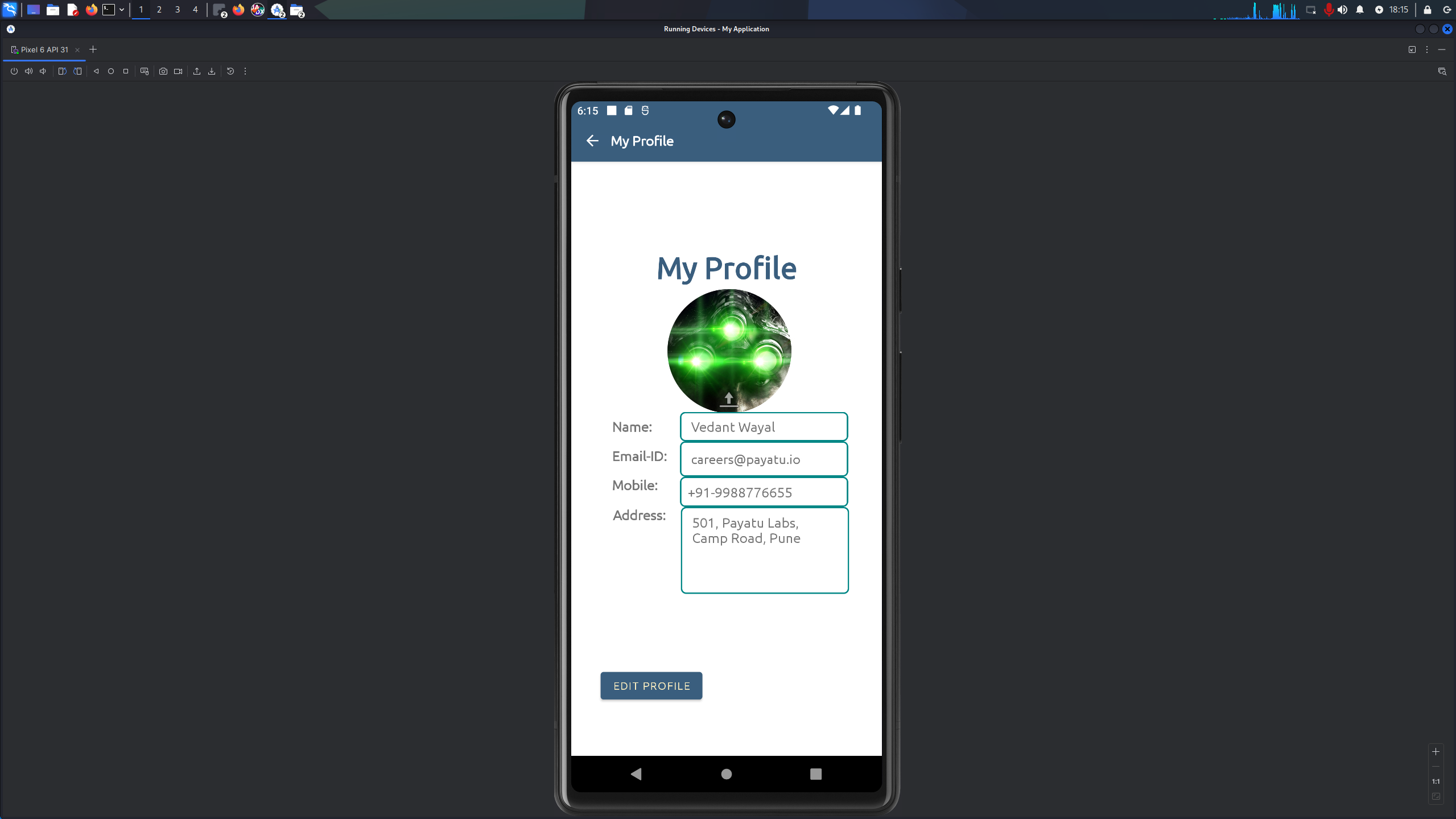
[Image: Successful login showing the profile page]
Impact and Security Implications
This vulnerability demonstrates that client-side authentication is inherently insecure. Any authentication logic that runs on the client can be bypassed through reverse engineering and code manipulation.
Real-World Implications
- Attackers can bypass login screens or other local authentications without knowing valid credentials
- Local authentication provides no real security against determined attackers
- Sensitive data protected only by local authentication is at risk
- This technique can be applied to many Android applications with similar vulnerabilities
- This technique can also be used to bypass the local root detection mechanisms in a similar methodology
Remediation and Best Practices
Secure Authentication Practices
- Server-side validation: Never rely solely on client-side authentication. Always validate credentials on a secure server
- Certificate pinning: Implement certificate pinning to prevent man-in-the-middle attacks
- Code obfuscation: Use ProGuard or R8 to obfuscate code, making reverse engineering more difficult
- Integrity checks: Use SafetyNet or Play Integrity API to verify app integrity
Always treat the client as untrusted. Any security logic that runs on the client device should be considered bypassable. Critical authentication and authorization decisions must be made on the server side.
Conclusion
This write-up demonstrated how easy it is to bypass local authentication mechanisms in Android applications through Smali code manipulation. By understanding how Android applications work at the bytecode level, we can identify and exploit vulnerabilities that arise from improper authentication implementation.
The key takeaway is that client-side security controls should never be relied upon as the sole protection mechanism. Authentication and authorization must be enforced on the server side, with the client merely acting as an interface. Local checks can provide user experience benefits, but should never be trusted for actual security.
I hope this write-up helps you understand the risks of client-side authentication and encourages better security practices in Android application development.
Additional Resources
- Jadx - Dex to Java Decompiler
- APKLab - VS Code Extension
- Smali/Baksmali Documentation
- OWASP Mobile Top 10
- Android Security Best Practices
If you found this write-up helpful or have questions about Android security testing, feel free to reach out via the contact section. Stay curious and hack responsibly!